Web
Basic Online E-Commerce Platform
A training-focused e-commerce web platform designed to demonstrate product browsing, shopping cart workflows, checkout interactions, and responsive online shopping experiences.
- Evidence
- Verified work
- Role
- full project
- Category
- Web
Overview
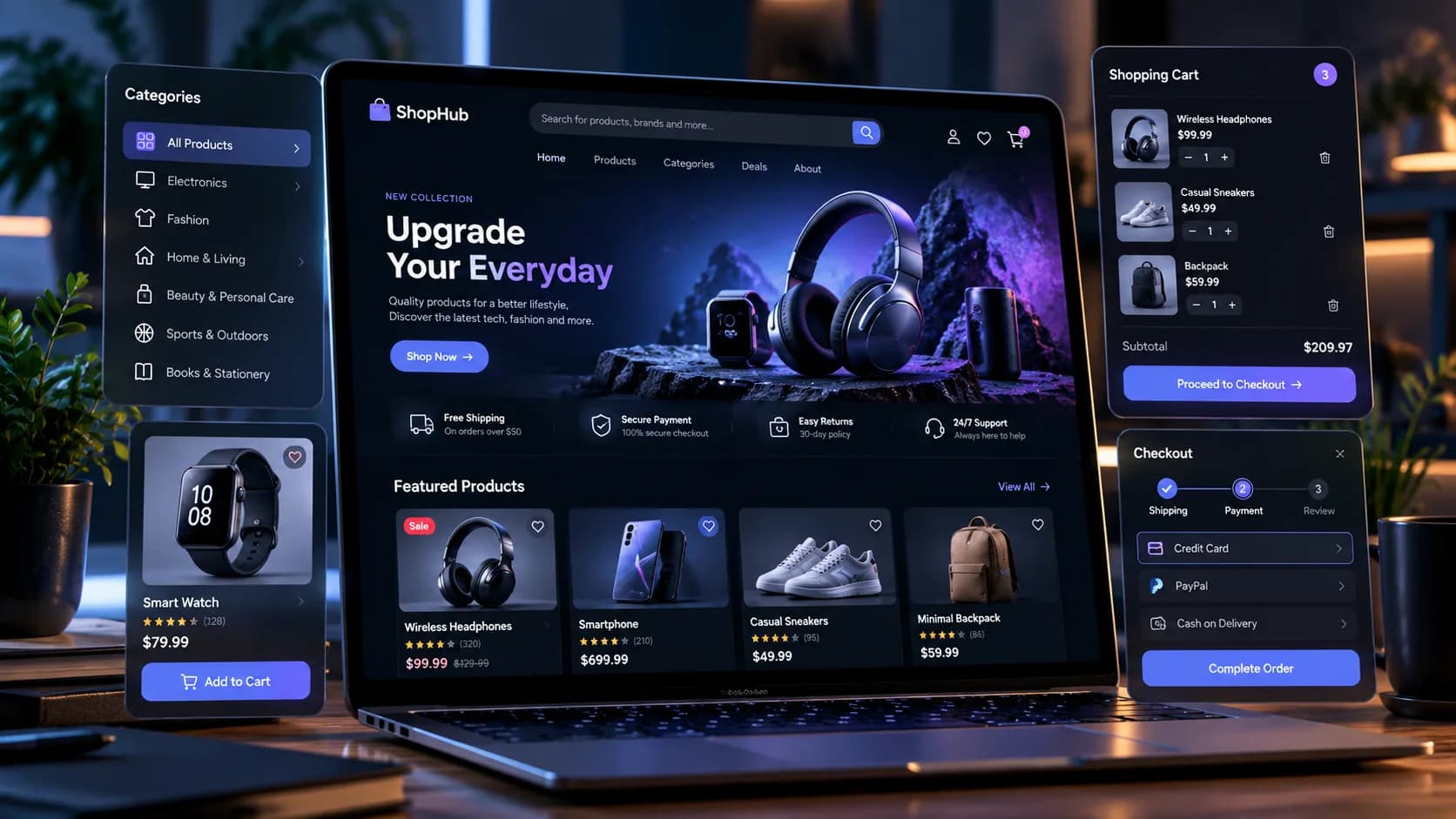
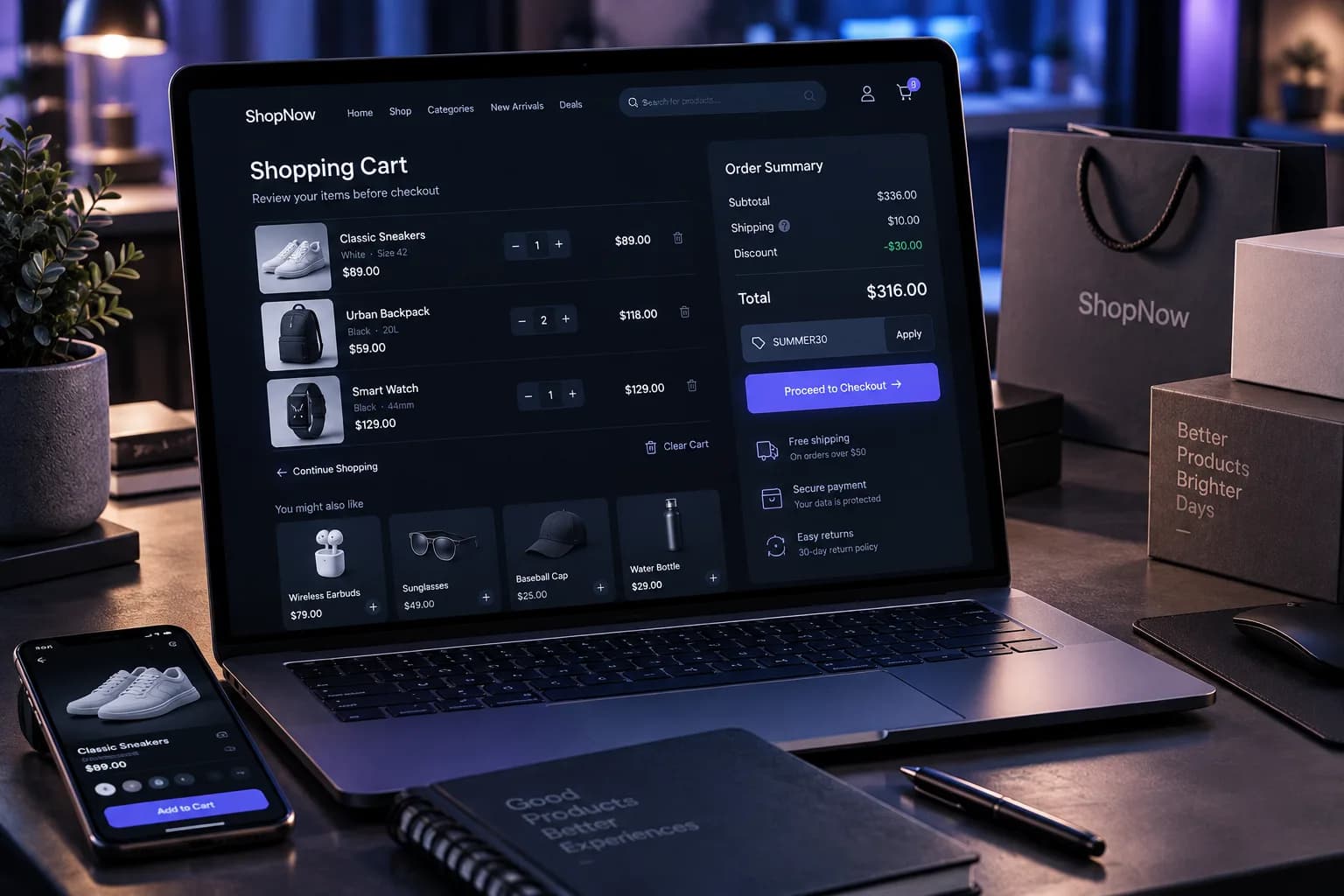
The Basic Online E-Commerce Platform is a training-focused web project built around the core experience of an online store.
The project explores how a modern e-commerce interface can bring together product discovery, categories, product details, shopping cart interactions, and checkout into a coherent customer journey.
Rather than focusing on enterprise-level commerce infrastructure, the project concentrates on understanding the structure and interaction patterns behind a practical online shopping experience.
Problem
An e-commerce website needs to do more than display products. It must guide users naturally from discovering a product to understanding it, adding it to their cart, reviewing their selection, and completing the purchasing flow.
For a training project, the challenge was to translate this journey into a clear web application while keeping the implementation understandable and focused.
The platform therefore needed to demonstrate the fundamental building blocks of e-commerce without introducing unnecessary complexity.
Constraints
The project was intentionally developed as a basic training web project, which limited its scope compared with a production e-commerce platform.
Key constraints included:
- Keeping the implementation understandable
- Focusing on core shopping workflows
- Avoiding unnecessary enterprise commerce features
- Keeping the user journey straightforward
- Maintaining a consistent visual system
- Demonstrating e-commerce concepts without overengineering the platform
The project was therefore designed as a practical foundation rather than a full commercial marketplace.
Approach
The project was approached by modeling the shopping experience as a sequence of connected interactions:
Discover → Browse → View Product → Add to Cart → Review Cart → Checkout
The interface was organized around common e-commerce patterns, including:
- Product categories
- Product listings
- Product search
- Product cards
- Product details
- Pricing and product information
- Shopping cart management
- Quantity controls
- Order summaries
- Checkout workflow
- Responsive layouts
The emphasis was on creating a consistent user journey where every stage naturally leads to the next.
Architecture
The platform can be structured around several core application areas:
Storefront → Product Catalog → Product Details → Cart → Checkout
Storefront Layer
Provides the main shopping experience, including navigation, categories, featured products, and product discovery.
Product Catalog
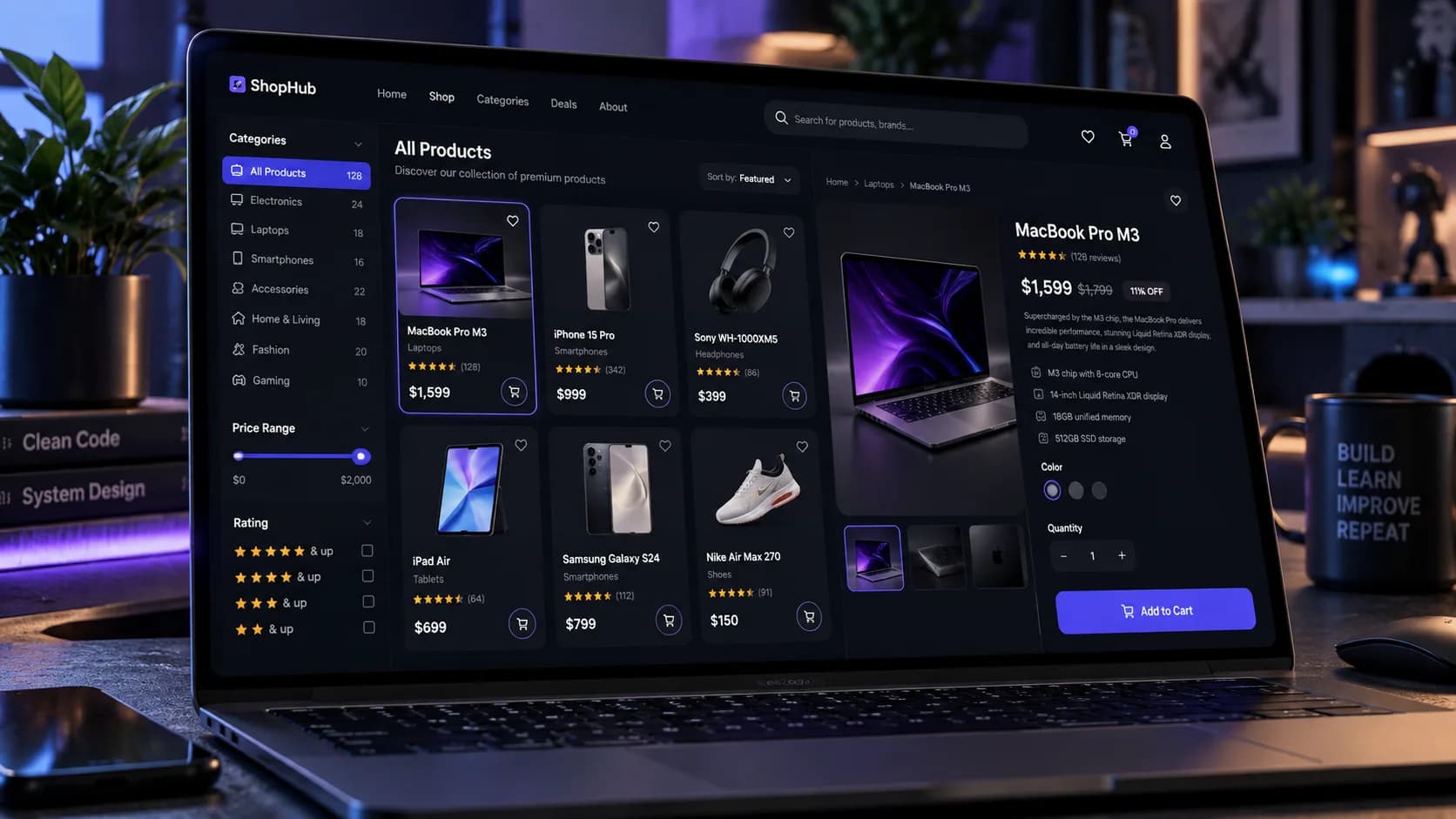
Responsible for displaying products and supporting common discovery interactions such as categories, search, filtering, and sorting.
Product Details
Provides more detailed information about an individual product and exposes the primary purchasing action.
Cart
Maintains the user's selected products and supports operations such as:
- Adding products
- Removing products
- Changing quantities
- Calculating subtotals
- Reviewing the order
Checkout
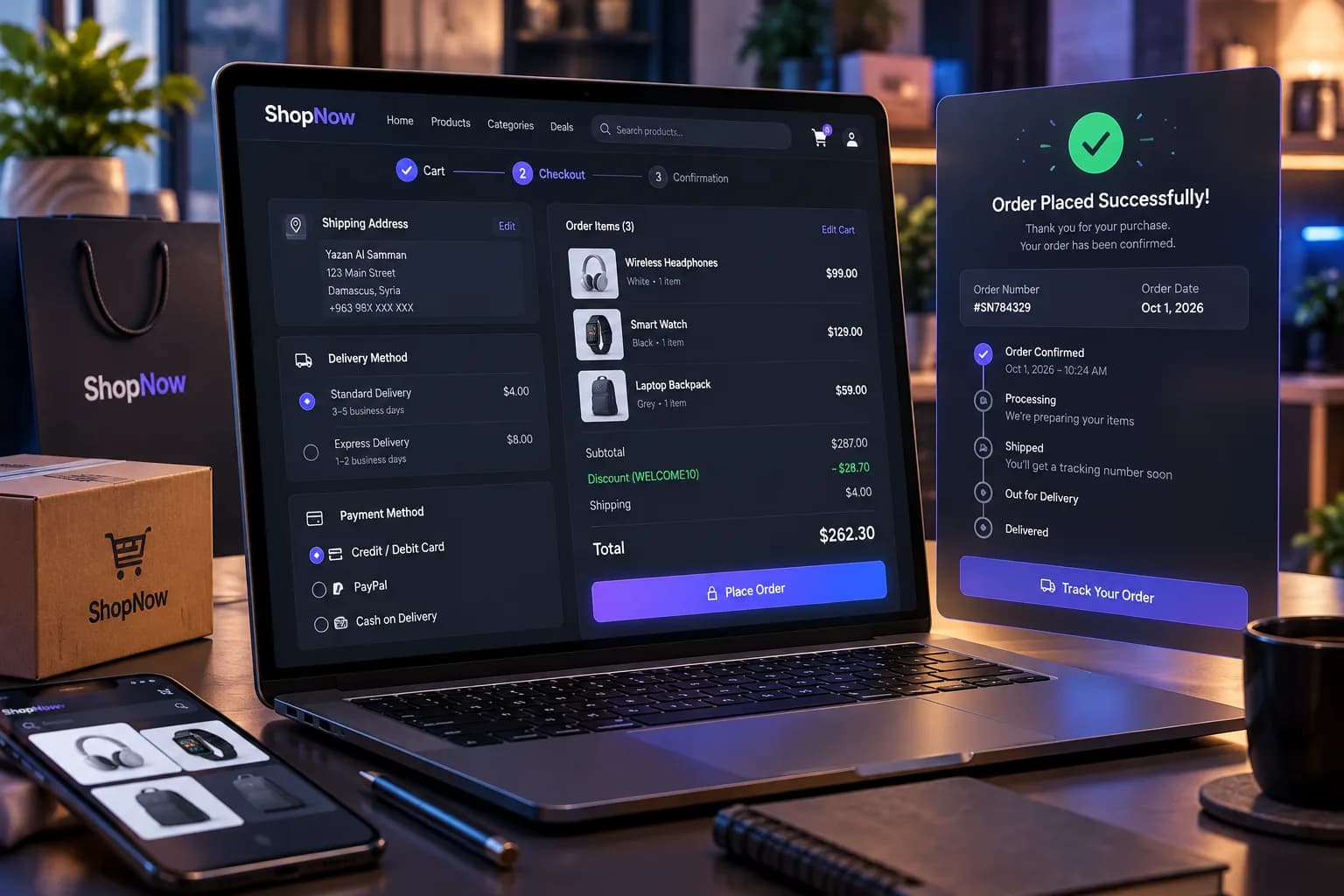
Brings the purchase together into a final review workflow containing order information, delivery/payment choices, discounts, and the final total.
Responsive Presentation
The interface is designed around responsive web principles so the same shopping concepts can be presented across desktop and mobile layouts.
Intelligence layer
This project does not depend on machine learning or an AI model.
Its intelligence comes from the application logic responsible for managing the shopping state and user journey.
Important logic includes:
- Product selection
- Category and search filtering
- Cart state management
- Quantity calculations
- Subtotal calculation
- Discount application
- Checkout validation
- Order-summary generation
- Responsive interaction behavior
This demonstrates an important principle in web engineering: useful application behavior does not necessarily require AI. Well-designed deterministic logic can provide a complete interactive experience.
Engineering decisions
Component-Based Interface
The e-commerce experience can be divided into reusable UI components such as product cards, navigation, filters, cart items, order summaries, and checkout sections.
Clear Separation of Shopping Concerns
Product discovery, product information, cart state, and checkout are treated as separate concerns while remaining connected through the overall customer journey.
Reusable Product Representation
Products are represented consistently across different parts of the interface, allowing the same product information to appear in listings, details, cart views, and checkout.
Explicit Cart Logic
Cart operations are handled through dedicated application logic rather than being scattered across individual interface elements.
Responsive-First Thinking
The interface considers both desktop and mobile shopping behavior instead of treating mobile as a secondary version of the website.
Training-Oriented Scope
The implementation intentionally focuses on the essential mechanics of e-commerce rather than attempting to reproduce the infrastructure of a production marketplace.
Challenges
1. Designing a Complete Shopping Journey
One of the main challenges was connecting multiple e-commerce interactions into one coherent flow instead of treating product browsing, cart management, and checkout as isolated pages.
2. Product Discovery
A useful storefront needs to help users find relevant products quickly. This requires thoughtful organization of categories, search, filtering, product cards, and visual hierarchy.
3. Cart State Management
Shopping carts introduce state that must remain consistent as users add products, remove them, or change quantities.
4. Checkout UX
Checkout contains several pieces of information that need to be presented without overwhelming the user, including selected products, quantities, delivery information, payment options, discounts, and the final order total.
5. Responsive E-Commerce Design
The shopping experience needs to remain usable across different screen sizes, particularly because e-commerce users may browse from both desktop and mobile devices.
6. Balancing Visual Design and Usability
Product-focused interfaces need strong visual presentation while still making essential actions such as Add to Cart, cart review, and checkout immediately understandable.
Results
The project produced a basic e-commerce web experience covering the essential customer journey from product discovery to checkout.
It demonstrates practical concepts in:
- Web application development
- E-commerce UX
- Product catalog design
- Responsive interface development
- State management
- Cart logic
- Checkout workflows
- Component-based UI architecture
As a foundation, the project could later be extended with capabilities such as authentication, persistent databases, payment gateways, order management, inventory systems, customer accounts, and administrative dashboards.
Media

Related projects
Web
yazanalsamman.com — Cinematic Portfolio Platform
This website: a bilingual, CMS-driven portfolio with a scroll-driven WebGL narrative, strict performance budgets, accessibility and SEO verification, and a containerised VPS deployment.
Stack
Web
Tabkha & More — Interactive Digital Menu and CMS
A bilingual interactive menu and restaurant CMS: React on Vite, a Hono API with Neon Postgres and Drizzle, session-authenticated admin, media uploads and a CI pipeline.
Stack
Web
NewLook — Branded Footwear E-Commerce Platform
A responsive e-commerce platform for branded footwear: WhatsApp OTP sign-up, map-based local delivery or governorate shipping, two currencies, and an admin panel for products, brands, delivery areas and orders.
Stack